


Looking for the right AI prompt for a baby photoshoot? You are not alone. Parents everywhere are skipping expensive studio bookings and creating professional-looking baby portraits from home, using nothing but a phone photo and a well-written prompt.
This article gives you both halves of the equation. For each idea, you will get a short explanation of the look, plus a ready-to-use AI baby photoshoot prompt you can copy, paste, and customize.
Whether you are after a viral baby photoshoot for Instagram, a newborn photoshoot idea for a birth announcement, or a simple milestone shot for the nursery wall, there's something here for you.
How to Write a Baby Photoshoot Prompt That Actually Works
A good baby photoshoot prompt has a few key ingredients. Skip these, and your AI-generated baby photos start looking generic.
Describe the pose clearly. "Sleeping in a basket" works better than just "cute baby photo."
Name the outfit and fabric. AI tools render texture much better when you say "knitted cream romper" instead of "nice outfit."
Set the lighting with real photography terms. "Golden hour rim light" or "soft window light" gives consistent results. Vague words like "good lighting" don't.
Add a camera and lens reference if you want that blurred, professional background. "85mm f/1.8" is a common one.
Note: Most standard AI generators struggle to keep a baby's face 100% identical using text alone. Text prompts describe what you want to see, but they don't actually lock onto your baby's real features, which is why plenty of AI baby photos come out looking like a stranger's kid in a cute outfit.
To get an exact match, you need an AI tool that explicitly uses your reference photo as a face and identity layer, not just a suggestion buried inside a paragraph of text.
That distinction matters more than any single word in your prompt. If you paste these prompts into a generic AI art generator, you will likely get a cute baby, just not necessarily your baby. To lock in your baby's exact features while still applying the styling below, you want a tool built specifically for photo editing rather than pure text-to-image generation.
Platforms like Blend let you upload your actual baby photo as the baseline, then use these exact prompts to swap the background, adjust the lighting, and build a professional studio scene around your baby's real face in seconds, instead of hoping a text-only generator gets the resemblance right.
RELATED READING: Interior Design Prompts: 25+ AI Prompts to Design Beautiful Spaces in Minutes
How to Create Beautiful Baby Pictures using Blend's AI Image Feature
You don't need a professional studio or expensive props to bring your ideas to life. If you have a vision, Blend's AI Image feature can turn a simple prompt into a beautifully styled baby portrait in minutes.
Getting started is easy:
- Open Blend and head to the AI Image tool.
- Describe your idea using a detailed prompt. For example, mention the setting, lighting, outfit, colours, props, and mood you'd like to create.
- Choose an image style that matches your vision, whether it's dreamy, realistic, storybook-inspired, vintage, or minimal.
- Generate multiple versions and pick the one you like best. Small prompt changes can produce surprisingly different results.
- Refine the prompt if needed by adjusting details like background, colours, camera angle, or facial expression until you're happy with the final image.
Once you've created your favourite portrait, you can take it one step further with Blend's AI Video feature. Animate the image with gentle camera movements, floating clouds, twinkling stars, drifting flower petals, or soft lighting effects to create a magical keepsake that's perfect for sharing with family or on social media.
The best part is that you don't need any design or editing experience. Simply describe what you imagine, let Blend generate the artwork, and experiment with different prompts until you create a baby portrait that feels truly special.
With that in mind, here are 15 baby photoshoot ideas and prompts to get you started.
Trendy At-Home AI Baby Photoshoot Ideas
These are the setups you can build without leaving your living room, using a corner, a window, or a simple backdrop as your starting point.
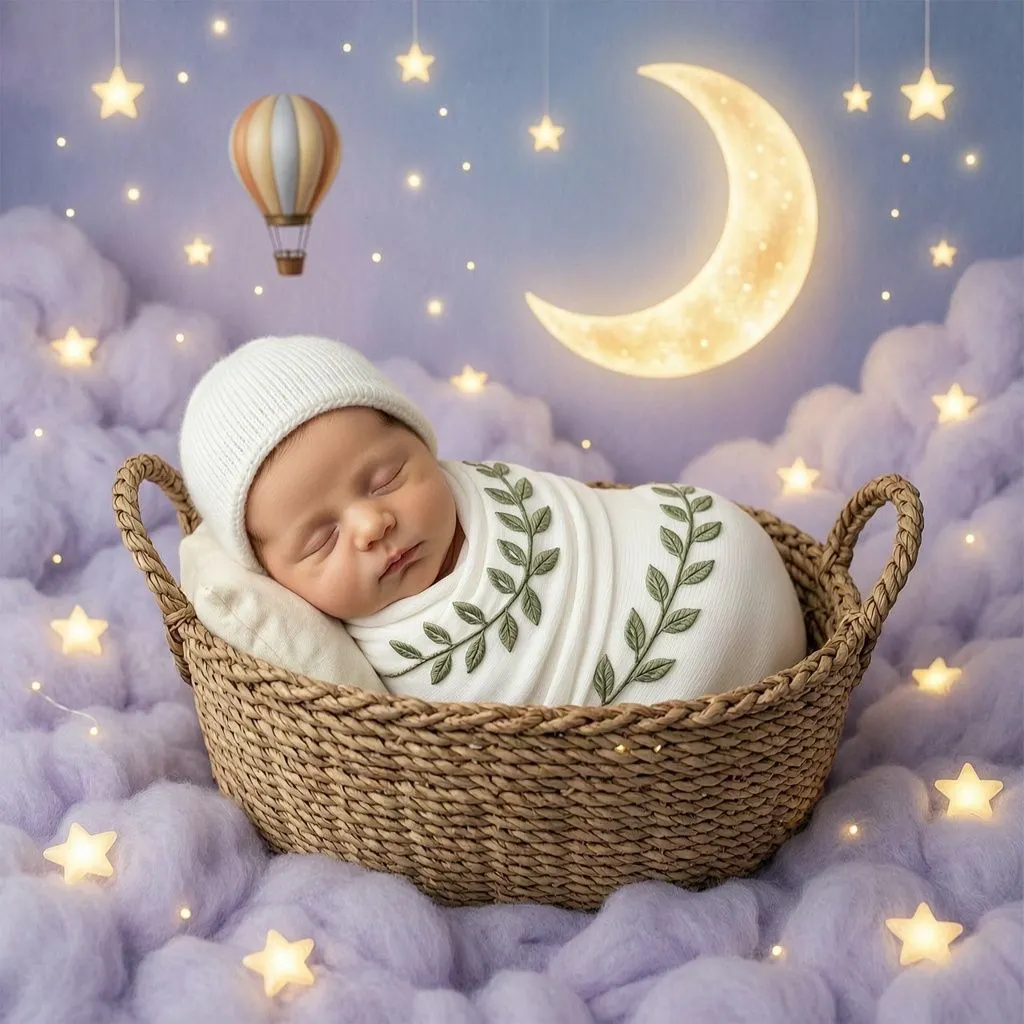
1. Celestial Nursery Dream
Soft blues, a glowing moon, and a tiny hot air balloon drifting in the background. This is one of the most popular AI baby photoshoot themes right now, and it's perfect for birth announcements.
Copy & Paste Prompt:
Using the uploaded photo as a strict face reference, create a dreamy celestial newborn portrait. Soft blue and lavender sky tones fill the background, with a glowing crescent moon and a small hot air balloon floating gently behind. The baby is peacefully sleeping in a woven basket, wrapped in a white leaf-patterned swaddle with a matching knit hat. Soft glowing light, fairy-tale mood, shallow depth of field, 85mm f/1.8. Keep the baby's face, skin tone, and features exactly unchanged.
2. Milk Bath Portrait
A vintage tub, a soft milky bath, floating flower petals, shot from directly above. It's a classic newborn photography look that's genuinely hard to shoot in real life, which makes it ideal for AI.
Copy & Paste Prompt:
Generate a top-down artistic portrait of the baby from the reference photo, sitting in a vintage galvanized tub filled with a soft milk bath and floating pink peonies. Soft natural window light, rustic wooden floor beneath the tub, calm and peaceful expression. Natural skin texture, no over-smoothing. Preserve the baby's exact facial identity from the uploaded photo.
3. Classic Studio Portrait
Simple, timeless, and never out of style. A plain seamless backdrop with soft directional lighting is still one of the most requested baby photoshoot ideas for a reason.
Copy & Paste Prompt:
Create a professional editorial newborn portrait. Neutral white studio background with pale blue highlights, baby sleeping peacefully in a basket, clean minimal composition with a small teddy bear prop. Crisp focus, magazine-style newborn photography, soft diffused studio lighting. No facial modification allowed.
4. Cozy Café Corner
Golden lighting, rustic wood, soft string lights in the background. It's a premium studio feel without leaving your living room, which is exactly why it's trending among parents searching for at-home baby photoshoot ideas.
Copy & Paste Prompt:
Generate a warm café-inspired portrait of the baby seated in a small wooden chair. Golden lighting, rustic wooden decor, string lights softly blurred in the background, cozy knit outfit. Shallow depth of field, dreamy Instagram aesthetic. Maintain identical facial features to the reference photo.
RELATED READING: 50 AI Maternity and Pregnancy Photoshoot Prompts You Can Use Right Now
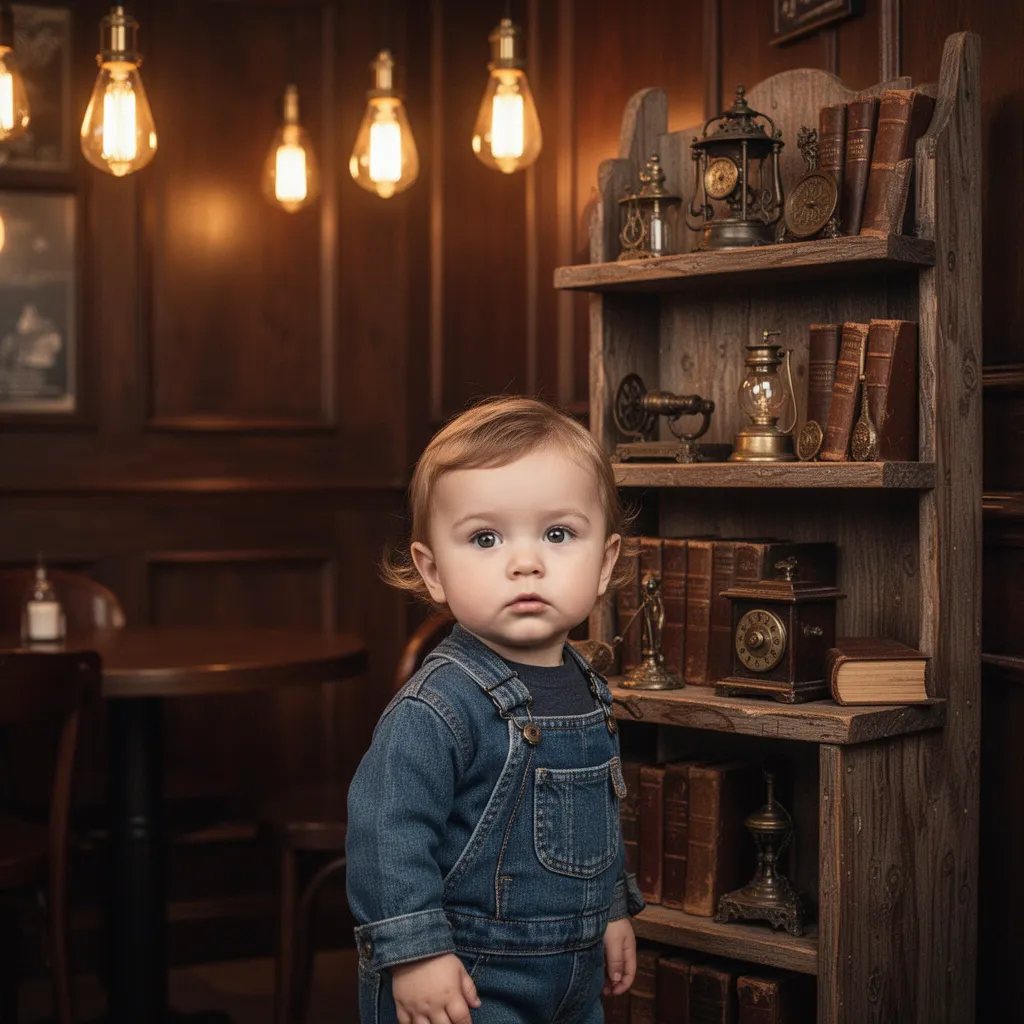
5. Shelf Display Storytelling Shot
Multiple miniature versions of your baby placed on a decorative shelf, each doing something small and sweet. This trending format turns a single photo into a mini story, and it's a favorite for viral baby photoshoot posts.
Copy & Paste Prompt:
Using the uploaded toddler image as a strict face reference, create a cinematic studio portrait in a warm wooden cafe-style setup with glowing Edison lights and vintage decor. Add a tall rustic wooden shelf beside the main portrait. Golden ambience, shallow depth of field, cozy aesthetic. Keep the exact same facial features, hairstyle, and identity unchanged.
6. Milestone Sitting-Up Portrait
Neutral backdrop, soft cushions, a wooden sign marking the month. This is the backbone shot for anyone building a full milestone photoshoot series.
Copy & Paste Prompt:
Generate a studio-style portrait of the baby sitting upright on a neutral beige backdrop, surrounded by soft cream cushions and a single wicker basket prop. Soft diffused studio lighting, warm clean tones, joyful natural expression. Add a small wooden sign showing the baby's age in months. Maintain complete facial accuracy to the uploaded photo.
7. Birth Announcement Flat Lay
A baby's hand resting on a name sign, tiny shoes, a soft folded blanket, shot from above. Less about the face, more about the small details that make an announcement feel personal.
Copy & Paste Prompt:
Create a clean overhead flat-lay image featuring the baby's hand resting on a small wooden name sign, alongside tiny knit shoes and a soft folded blanket. Even, soft studio lighting, neutral cream background, minimal styling. If the baby's face is included, keep it exactly consistent with the reference photo.
Lifestyle & Outdoor AI Baby Photoshoot Ideas
These lean more natural and candid, built around light and setting rather than heavy styling.
8. Giant Flower Field
Flowers that tower over your baby like trees, sunlight pouring through oversized petals. A fantasy-leaning idea that works especially well once your baby can sit up on their own.
Copy & Paste Prompt:
Create an ultra-realistic surreal portrait based on the uploaded reference photo. The baby stands in the middle of a towering flower field, petals wider than umbrellas, hyper-detailed with visible veins and dew droplets. Soft pastel outfit with a cozy hat, looking upward in awe. Volumetric sunbeams filtering through the stems, dreamy misty haze. Keep the baby's facial features identical to the reference.
RELATED READING: 35 AI Prompts for Instagram Influencers to Create High-Engagement Photos
9. Lifestyle Nursery Candid
No heavy posing here. Just soft window light, neutral tones, and your baby caught mid-yawn. Documentary-style baby photography has become one of the biggest trends this year, outpacing rigid studio poses.
Copy & Paste Prompt:
Generate a candid lifestyle portrait of the baby in a nursery setting. Soft, even window light, neutral cream and sage tones in the background, baby mid-yawn while lying on a soft blanket. Documentary-style, unposed, natural shadows, realistic skin texture. Maintain complete facial accuracy to the uploaded photo.
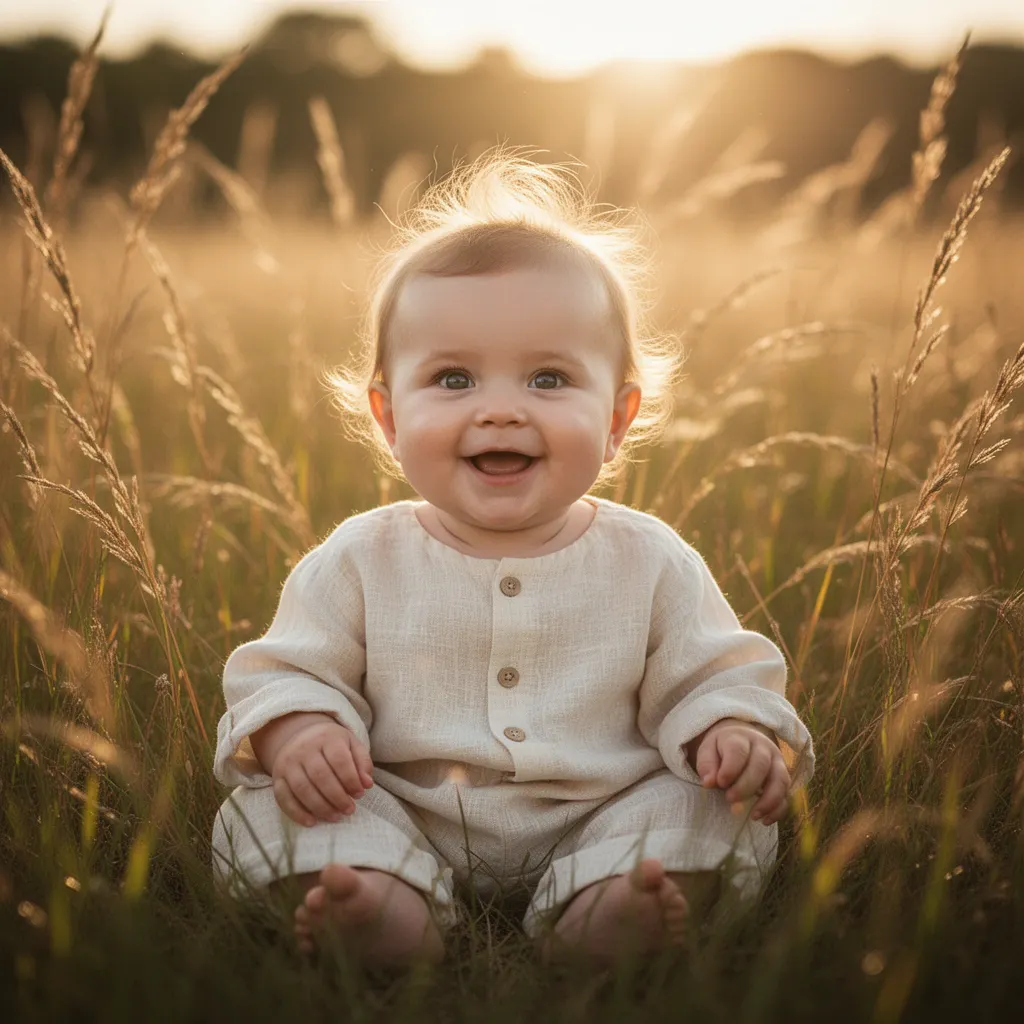
10. Golden Hour Field Portrait
Warm rim light, a softly blurred background, and a natural candid expression. One of the easiest ideas to shoot for real, and just as easy to recreate with an AI prompt if you don't have the right backdrop nearby.
Copy & Paste Prompt:
Create a lifestyle portrait of the baby sitting in a field of tall grass during golden hour. Warm rim lighting outlining the baby's hair, soft bokeh background, natural candid expression, wearing a simple cream linen outfit. Shot on an 85mm lens with a wide aperture for creamy background blur. Preserve the baby's exact facial features from the reference photo.
11. Beach Sunset Portrait
Golden light, soft sand, bare feet, a relaxed natural pose. If you don't live near a coastline, this is one of the easiest scenes to recreate with an AI-generated background instead of a trip.
Copy & Paste Prompt:
Create a lifestyle portrait of the baby sitting on soft sand during sunset. Warm golden light, gentle ocean blur in the background, simple linen outfit, bare feet, relaxed natural pose. Soft shadows, realistic skin tones. Keep the baby's facial identity unchanged from the reference photo.
12. Skin-to-Skin Parent Moment
Quiet, intimate, and emotional. This idea barely needs styling because the connection between parent and baby carries the whole photo.
Copy & Paste Prompt:
Create a soft, emotional portrait of a parent holding the baby skin-to-skin. Natural window light, muted neutral tones, gentle shadows, calm and intimate mood. Realistic skin texture on both subjects. Keep the baby's facial features exactly as shown in the reference photo.
RELATED READING: 50+ AI Photography Prompts for High-Converting Images
13. Heritage Silk Outfit Portrait
Traditional clothing, cultural decor, real emotional weight. Heritage-themed baby photos consistently get the most saves and shares because they mean something beyond just being cute.
Copy & Paste Prompt:
Create a warm, traditional portrait of the baby dressed in a richly embroidered silk outfit in pink and gold, seated on a decorated wooden swing surrounded by fresh jasmine and marigold flowers. Soft indoor golden lighting, festive home decor with hanging diyas in the background, joyful expression. Keep facial features 100% consistent with the reference image.
Seasonal & Holiday AI Baby Photoshoot Prompts
Quick to generate, easy to reuse every year, and great for cards.
14. Halloween Pumpkin Patch
A knitted pumpkin costume, soft autumn light, tiny pumpkins scattered around. Seasonal baby photoshoot prompts like this one are easy to generate any time of year, so you can get your holiday content done early.
Copy & Paste Prompt:
Generate a playful Halloween-themed baby portrait. The baby sits inside a small pumpkin patch with soft autumn light filtering through, wearing a knitted pumpkin costume with a cream beanie. Warm orange and cream tones, gentle natural shadows, joyful candid smile. Preserve the baby's original facial identity exactly.
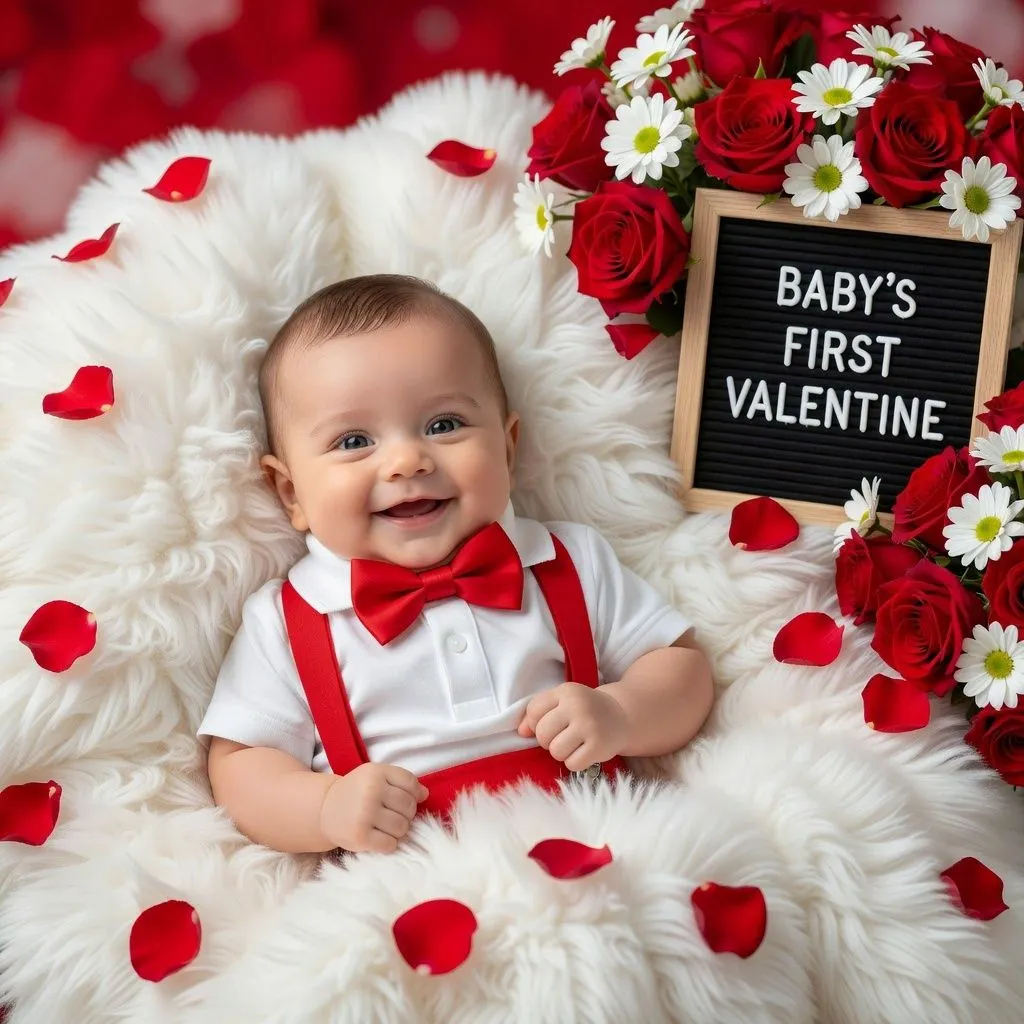
15. Valentine's Day Sweetheart
Faux fur, rose petals, a tiny bowtie, and a cheeky hand-lettered sign. Simple styling, high shareability, and it takes almost no effort to set up.
Copy & Paste Prompt:
Create an 8k ultra-realistic picture using the reference photo. Keep the face 100% unchanged. The baby is lying on a soft white faux-fur background scattered with red rose petals, dressed in a white polo shirt with red suspenders and a matching bowtie. Framed by a bouquet of red roses and daisies, with a black letter board nearby. Bright toothless smile, festive red-and-white color palette.
Tips for Getting Realistic Results
Run tricky prompts more than once. AI image generation has randomness built in, so hands, props, and teeth sometimes need a second pass.
- Keep your lighting language consistent across a series. If you are building a full milestone set, this is what makes the photos feel like they belong together.
- Watch for over-smoothed skin. Adding "natural skin texture, no over-smoothing" to your prompt helps keep things looking real instead of plastic.
- Always protect the face. As covered earlier, the identity-lock line only works as well as the tool behind it, so pair your prompt with an editor that actually treats your reference photo as a face layer, not just a style suggestion.
Conclusion
Once you have picked a few ideas from this list, the easiest way to keep them consistent is to build them all inside the same tool. Blend is here to help you in this workflow. Upload your baby's real photo once, then apply any of the prompts above to swap the background, adjust the lighting, and generate a full studio-style scene, while keeping your baby's actual face locked in across every image.