


Amazon shoppers have the attention span of someone scrolling TikTok at midnight. If your product doesn’t look interesting in the first second, they are already looking at the next one. Your Amazon listing images need to be eye-catching and powerful to grab the customer’s attention at first glance.
Statistics say that well-optimized amazon listing images increase click-through rate, improve conversion rate, and can even help your listing rank higher on Amazon’s search results. Your products will have millions of competitors. Hence, strong visuals are important if you want your eCommerce business to succeed.
Scroll down and find out how to create high-converting Amazon product listing images, understand Amazon’s listing image requirements, and use modern AI tools like Blend Studio Shot to generate professional product photos.
Why Amazon Listing Images Matter
According to research, Amazon’s ranking algorithm works in a way that the most high conversion products are pushed to the top of the search results. That’s why strong Amazon product images can help your product sell organically.
We all shop on Amazon regularly and if there’s one thing we can say for sure it’s that none of us read the full description before exploring the features of a product. All we do is take a look at the product image and decide whether it’s something we want or not.
Listings with optimized visuals typically experience improvements in:
- Click-through rate from search results
- Conversion rate on the product page
- Customer trust and perceived product value
Amazon Listing Image Requirements in 2026
Before creating images, it’s important to follow Amazon’s official image guidelines. If your images don’t meet these standards, Amazon may suppress the listing or prevent images from displaying correctly.
The main product image must follow several key rules:
- The background must be pure white (#FFFFFF)
- The product must fill at least 85% of the frame
- Only the product being sold should appear in the image
- The image size should be at least 1000 × 1000 pixels
- JPEG, PNG, or TIFF formats are accepted
However, most experienced sellers recommend uploading images that are 2000 × 2000 pixels or larger. They say that the sweet spot for Amazon product image dimensions is somewhere between 2000 and 3000 pixels.
Generate Amazon Listing Images with Blend’s Studio Shot
One of the fastest ways to create professional amazon listing images is with Blend Studio Shot. Instead of organizing a photoshoot, sellers can upload their product and instantly generate studio-quality visuals designed for eCommerce. Here’s a step-by-step guide on how to create Amazon listing images with Blend:
Step 1: Upload Your Product Image
First, upload your product image into Blend Studio Shot. Once you upload your photo, the system automatically prepares it for enhancement.
Step 2: Check the Before and After Results
After uploading your image, you can instantly compare the before and after versions. The original image shows the product as it was uploaded.
The enhanced version shows how Blend Studio Shot transforms it into a cleaner, studio-style product image. This makes it easier for your product to look professional and trustworthy.
Check out these Studio Shot images and their Before and After results that I created using Blend:


Same product with a better background. Also, Blend doesn’t do anything to alter it.
Step 3: Customize Your Image Using Built-In Tools
Once your image is generated, you can refine it using the editing tools available inside Studio Shot.
You can adjust your product using the below options too:
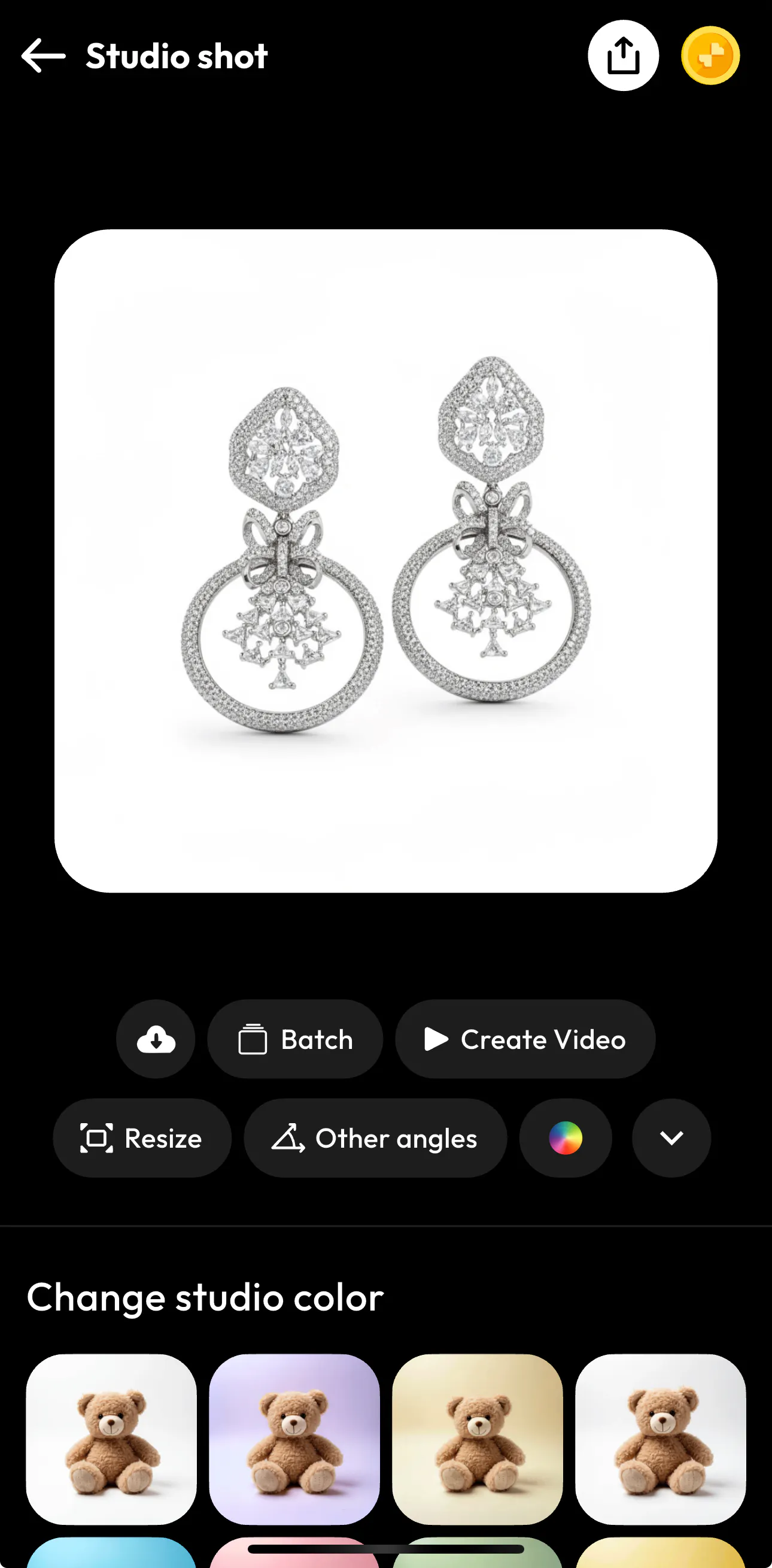
- Resize your image to match Amazon listing dimensions or other marketplace formats
- Generate other angles to showcase different product perspectives
- Use Batch to create multiple images at once for a full Amazon image set
- Create engaging product videos from your images
- Adjust studio background colors to match your brand style
- Enhance image quality with editing and optimization tools
These options help you create different types of Amazon listing images, including enhanced product shots, infographic visuals, and other images commonly used in successful listings.
The 6 Essential Amazon Listing Images
Don’t think that successful listings rarely rely on just one product photo. In most cases, the best performing listings include 6 well-designed images:
1. Main Product Image
The main image is the thumbnail customers see in Amazon search results. Because this image determines whether shoppers click on your listing, it must be clear, professional, and high resolution.
A good main image usually includes strong lighting, a sharp focus on the product, and a clean white background.
2. Lifestyle Images
Lifestyle images show how the product fits into everyday life. Instead of simply displaying the item, these images show it being used in a realistic environment.
For example, you can try Blend’s Lifestyle Shot feature to showcase a kitchen product might be shown while cooking, while a fitness product might appear in a gym setting. Such visuals help customers imagine themselves using the product.

(Picture created using Blend’s Lifestyle Shot)
3. Feature Infographic Images
Infographic images highlight your product’s key features using short text and icons. What happens is customers usually skim through product listings quickly, sometimes reluctantly. So, you can grab their attention by creating infographics.
Common elements shown in infographics include materials, durability, performance benefits, and unique selling points.
You can create infographics on Blend like the below picture using Blend’s AI Design feature:

4. Close-Up Detail Images
Close-up shots help you showcase the small details that make your product special. When you zoom in on elements like materials, textures, stitching, or craftsmanship, you give customers a closer look at the quality of what you are selling.
When shoppers can clearly see these details, it feels almost as if they are examining the product in person. This will build trust between you and the buyers.
5. Size and Dimension Images
One of the most common causes of product returns is misunderstanding the size of the product. You can avoid this by using dimension images that clearly display measurements and scale comparisons.
When you show the product in a real environment, you also help customers better understand its actual size and how it fits into everyday use.
6. Comparison Chart Images
Comparison charts help customers understand how your product differs from alternatives.
These visuals might compare different versions of your product or highlight features that competing products lack. Done correctly, comparison images guide buyers toward choosing your product.
Conclusion
High-quality Amazon product listing images help customers understand what they are buying and encourage them to click on your listing. When you improve your image presentation, you can make your product stand out among competing listings. Blend makes it easier for you and creates Studio Shot images in seconds.